First Steps in Python: Writing Your First Program
Python is one of the friendliest programming languages for beginners, because its instructions read almost like plain English. Taking your first steps Python writing first program needs only a computer, a free editor, and a little patience. In this guide, you will set up your tools, write a program that prints a greeting, store information in variables, and finish by building a tiny calculator that adds two numbers. By the end, you will have written and run real programs, and you will understand how programmers think.
What Is Python?
Python is a programming language: a set of words and rules for giving instructions to a computer. It is used for websites, data work, games, science, and automation, but it is also a favourite first language, because its programs are short and readable. A Python instruction such as print, followed by words in brackets, tells the computer to show those words on the screen. That readability is the reason Python is taught in schools around the world.
Like every language, Python is strict about small details. A missing bracket, a wrong capital letter, or a misplaced space can stop a program from running. That strictness is not a fault: it is how the computer understands exactly what you mean. Beginners who learn to read error messages calmly, and to check their typing before blaming the computer, learn Python faster than those who guess.
Setting Up Your Editor
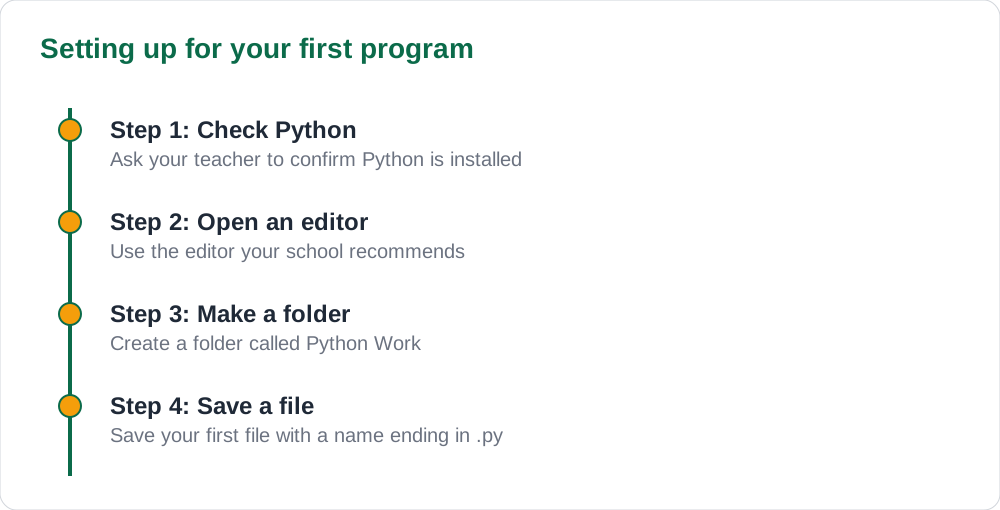
You need two things: Python itself, and an editor where you type your programs. Many computers already have Python, and your teacher can confirm whether yours does. For an editor, use a simple, free one your teacher recommends, such as the editor that comes with Python, or a classroom-approved code editor. Avoid typing code in a word processor, because word processors add hidden formatting that breaks programs.
Save your first file with a clear name ending in .py, in a folder you can find again, such as a folder called Python Work. Get into the habit of saving before you run, because an unsaved file cannot run correctly. Ask your teacher which editor and which Python version your school uses, and follow the school setup, so your programs match what the class is learning.
Your First Program: Print
Type this line in your editor, then save and run it: print(Hello, world!). The computer shows Hello, world! on the screen. The word print is a command, the brackets hold what the command works on, and the quotation marks show that the words inside are text, not instructions. Change the words inside the quotation marks, run again, and the screen shows your new message. You have just written, run, and changed a program.
Try a few more print lines, one under the other. Each print shows on its own line, and the program runs from top to bottom, in order. This top-to-bottom order is the same step-by-step order you met in flowcharts, where an algorithm lists steps in sequence. If you drew flowcharts before coding, see our guide to flowcharts algorithms basics beginners: the print program is simply a flowchart with one process box after another.
Variables: Storing Information
A variable is a named box that holds information. The line name = Ali stores the word Ali in a variable called name, and the line age = 13 stores the number 13 in a variable called age. Later, print(name) shows whatever the box holds. Variables let programs remember things: a pupil name, a mark, a total. Without variables, a program could only work with numbers and words typed directly into it.
Choose variable names that say what they hold: pupil_name is better than x, and total_marks is better than t. Names must start with a letter, contain no spaces, and match exactly every time you use them, because Python treats Name and name as two different boxes. One of the most common beginner errors is a name typed differently in two places. When a program complains that a name is unknown, check the spelling of that name first.
- A variable is a named box that holds information.
- Use names that say what they hold, such as pupil_name.
- Names start with a letter, have no spaces, and must match exactly.
- Text goes in quotation marks; plain numbers do not.
A Tiny Calculator Program
Now combine printing and variables into a tiny calculator. Store two numbers in variables, add them, store the answer in a third variable, and print it. The program is four short lines: first = 12, second = 8, total = first + second, print(total). Run it, and the screen shows 20. Change the two numbers, run again, and the answer changes, because the program calculates instead of memorising one answer.
Try improving the calculator. Add a line that multiplies the two numbers, and print a message with the answer. If the program shows an error, read the message: it usually names the line and the problem. The error message is the computer trying to help you, not scolding you. Fix one error at a time, run again, and keep going. That loop of write, run, read the error, and fix is how all programmers work, beginners and experts alike.
AI Help: Muse AI
Muse AI is Meta's personal AI assistant, and it can help with explaining a Python error message in plain words when your program will not run. Muse AI does not give official Sindh Textbook Board answers — always verify against your Sindh Textbook Board book and your teacher.
Join Muse with invite code LTGSWD — in the Muse app, go to Settings > Redeem token and enter the code.
Disclosure: LTGSWD is the author's Muse invite code.
5 key points you must know
- Python instructions read almost like plain English.
- Type code in a code editor, never in a word processor.
- print shows words on the screen; quotation marks mark text.
- A variable is a named box that holds information for later.
- Write, run, read the error, fix: that loop is how programmers work.
Frequently asked questions
Do I need the internet to learn Python?
No. Once Python and an editor are installed, you can write and run programs offline. The internet helps for looking things up, but it is not needed for writing your first programs.
Why does my program show an error for a missing bracket?
Because Python needs brackets to know where a command starts and ends. A missing bracket makes the instruction unclear, so the computer stops and reports the line. Add the bracket and run again.
What is the difference between text and numbers in Python?
Text goes in quotation marks and is treated as words, while plain numbers are treated as values you can calculate with. The line age = 13 stores a number, but name = Ali stores text.
My program ran but the answer is wrong. What should I check?
Check your variables and your arithmetic first. Print each variable to see what it holds, and check that every name is spelled the same way in every line.
Solved notes — preview free
These guides work best with the solved exercises. Preview the solved notes free on this website — 119 solved notes for Classes 6–10 in Sindhi, Urdu, English and Arabic medium. Or browse the full solved notes catalogue for your class and medium. New solved notes are added regularly — check the catalogue for coming-soon books.